libaribb25でlibsobacasを使う方法 + recpt1でMirakurunに設定
WindowsでPT3を用いて、DTVをしていたのですが、Windows11のアップデート関連で不安定だったり、そもそもPT3のドライバーがWindows11に若干非対応(対応する策はあるのだが、上手く行ったり行かなかったりなどとても面倒)など、様々な理由あり、安定性にかけていたところがありました。そんな中、つくみ島だより 様がLinuxで構築するとてもわかり易いガイドを公開、私もLinuxに移行しようかと思いました!
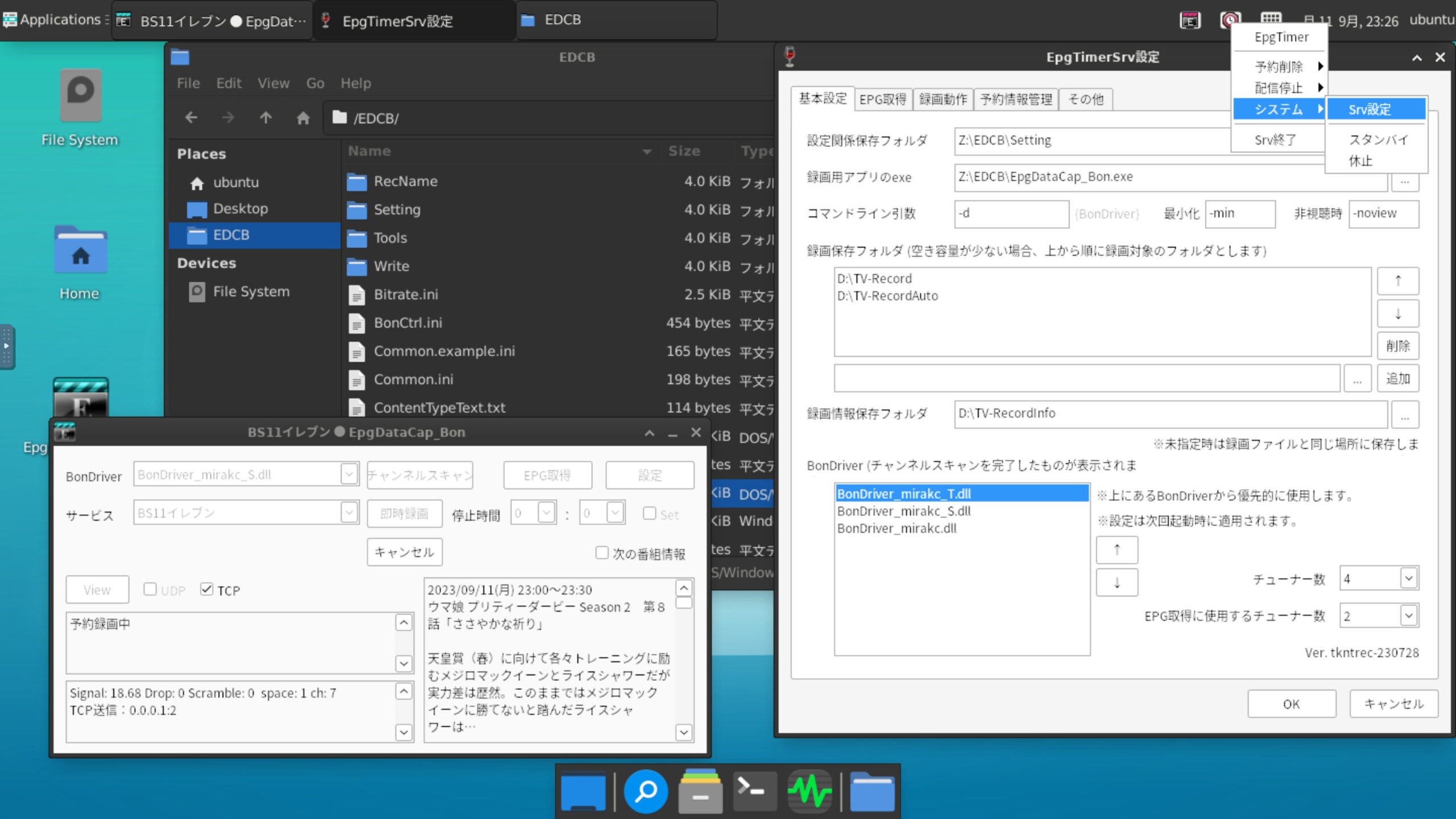
ただ、移行に際して、私の環境では、物理のBCASカードではなく、Softcasを使用していたため、どうやってSoftcasに移行しようかと考えているとこんなGithubのレポジトリを発見

巷では、libpcsclite.soをlibpcsckai.soなどに名前変更などで対処している方がいるが、それはあまりスマートなやり方ではないし、面倒である。
これなら、つくみ島だより 様の構築ガイドの “recisdb のインストール” 部分のみ変更すれば実現できると思いました。
今回はそのやり方について解説します。
くれぐれも自己責任でお願いしますよ。
私の環境
私は仮想環境内にVMを作成して行っています。今回の構築に関しては仮想環境である必要はありません。
需要があればGPUとPT3のパススルー方法についての記事を作成しようとも思っているので、コメントを下さい!
仮想環境:Proxmox Virtual Environment 8.4.14
ハード:A520M-A PRO, Ryzen 5 4650G, Corsair DDR4 32GB(3600MHz), NVMe 512GB
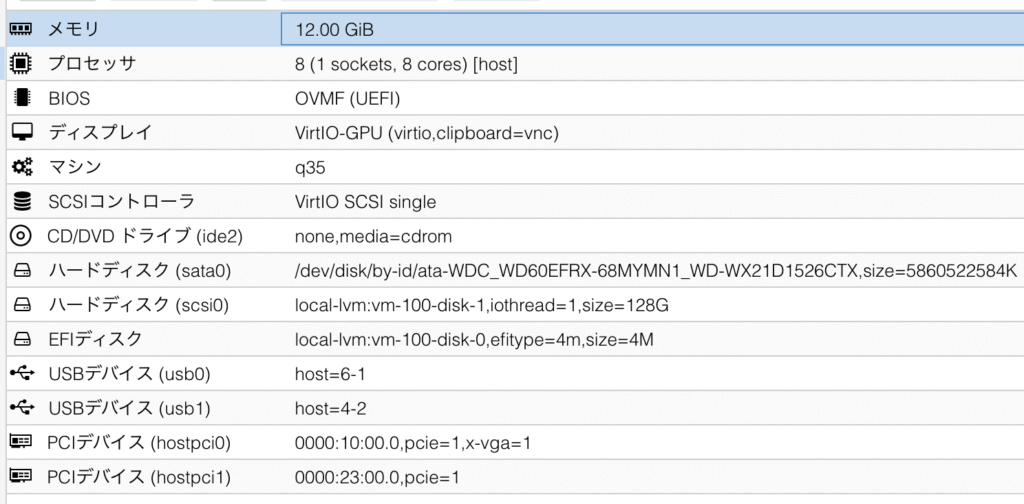
VMは以下の設定
メモリ:12.00GiB, プロセッサ:8 (1 sockets, 8 cores), BIOS OVMF(UEFI), マシン:q35
PCIデバイス(hostpci0) 0000:10:00.0,pcie=1,x-vga=1 → GPU
PCIデバイス(hostpci0) 0000:23:00.0,pcie=1 → PT3
あと、HDDのパススルーなど
OS:Ubuntu Desktop 24.04.01
OSはServer版でもできるが、GPUをパススルーしている関係で今回はDesktop版を使用している。
構築方法
ホームディレクトリに適当な作業フォルダを作成
sudo mkdir dtv
cd dtv
必要なライブラリをインストール
sudo apt-get install autoconf automake cmake libtool libpcsclite-devこれ以外にもnot found “〇〇” が出たら適宜インストールしてください。
libyakisobaのインストール
libsobacasにはlibyakisobaが必要なので、まずはこれをインストールしましょう。
sudo git clone https://github.com/tsunoda14/libyakisoba.git実行結果
Cloning into ‘libyakisoba’…
remote: Enumerating objects: 22, done.
remote: Counting objects: 100% (22/22), done.
remote: Compressing objects: 100% (21/21), done.
remote: Total 22 (delta 0), reused 22 (delta 0), pack-reused 0 (from 0)
Receiving objects: 100% (22/22), 28.27 KiB | 2.57 MiB/s, done.
sudo autoreconf -i実行結果
aclocal: warning: couldn't open directory 'm4': No such file or directory
libtoolize: putting auxiliary files in AC_CONFIG_AUX_DIR, 'build-aux'.
libtoolize: copying file 'build-aux/ltmain.sh'
libtoolize: putting macros in AC_CONFIG_MACRO_DIRS, 'm4'.
libtoolize: copying file 'm4/libtool.m4'
libtoolize: copying file 'm4/ltoptions.m4'
libtoolize: copying file 'm4/ltsugar.m4'
libtoolize: copying file 'm4/ltversion.m4'
libtoolize: copying file 'm4/lt~obsolete.m4'
configure.ac:15: warning: The macro `AC_PROG_CC_STDC' is obsolete.
configure.ac:15: You should run autoupdate.
./lib/autoconf/c.m4:1666: AC_PROG_CC_STDC is expanded from...
configure.ac:15: the top level
configure.ac:10: installing 'build-aux/compile'
configure.ac:10: installing 'build-aux/config.guess'
configure.ac:10: installing 'build-aux/config.sub'
configure.ac:11: installing 'build-aux/install-sh'
configure.ac:11: installing 'build-aux/missing'
src/Makefile.am: installing 'build-aux/depcomp'
parallel-tests: installing 'build-aux/test-driver'
sudo mkdir build
cd buildsudo ../configure --sysconfdir /usr/local/etc実行結果
checking build system type... x86_64-pc-linux-gnu
checking host system type... x86_64-pc-linux-gnu
checking how to print strings... printf
checking for gcc... gcc
checking whether the C compiler works... yes
checking for C compiler default output file name... a.out
checking for suffix of executables...
checking whether we are cross compiling... no
checking for suffix of object files... o
checking whether the compiler supports GNU C... yes
checking whether gcc accepts -g... yes
checking for gcc option to enable C11 features... none needed
checking whether gcc understands -c and -o together... yes
checking for a sed that does not truncate output... /usr/bin/sed
checking for grep that handles long lines and -e... /usr/bin/grep
checking for egrep... /usr/bin/grep -E
checking for fgrep... /usr/bin/grep -F
checking for ld used by gcc... /usr/bin/ld
checking if the linker (/usr/bin/ld) is GNU ld... yes
checking for BSD- or MS-compatible name lister (nm)... /usr/bin/nm -B
checking the name lister (/usr/bin/nm -B) interface... BSD nm
checking whether ln -s works... yes
checking the maximum length of command line arguments... 1572864
checking how to convert x86_64-pc-linux-gnu file names to x86_64-pc-linux-gnu format... func_convert_file_noop
checking how to convert x86_64-pc-linux-gnu file names to toolchain format... func_convert_file_noop
checking for /usr/bin/ld option to reload object files... -r
checking for file... file
checking for objdump... objdump
checking how to recognize dependent libraries... pass_all
checking for dlltool... no
checking how to associate runtime and link libraries... printf %sn
checking for ar... ar
checking for archiver @FILE support... @
checking for strip... strip
checking for ranlib... ranlib
checking for gawk... gawk
checking command to parse /usr/bin/nm -B output from gcc object... ok
checking for sysroot... no
checking for a working dd... /usr/bin/dd
checking how to truncate binary pipes... /usr/bin/dd bs=4096 count=1
checking for mt... mt
checking if mt is a manifest tool... no
checking for stdio.h... yes
checking for stdlib.h... yes
checking for string.h... yes
checking for inttypes.h... yes
checking for stdint.h... yes
checking for strings.h... yes
checking for sys/stat.h... yes
checking for sys/types.h... yes
checking for unistd.h... yes
checking for dlfcn.h... yes
checking for objdir... .libs
checking if gcc supports -fno-rtti -fno-exceptions... no
checking for gcc option to produce PIC... -fPIC -DPIC
checking if gcc PIC flag -fPIC -DPIC works... yes
checking if gcc static flag -static works... yes
checking if gcc supports -c -o file.o... yes
checking if gcc supports -c -o file.o... (cached) yes
checking whether the gcc linker (/usr/bin/ld -m elf_x86_64) supports shared libraries... yes
checking whether -lc should be explicitly linked in... no
checking dynamic linker characteristics... GNU/Linux ld.so
checking how to hardcode library paths into programs... immediate
checking whether stripping libraries is possible... yes
checking if libtool supports shared libraries... yes
checking whether to build shared libraries... yes
checking whether to build static libraries... yes
checking for a BSD-compatible install... /usr/bin/install -c
checking whether build environment is sane... yes
checking for a race-free mkdir -p... /usr/bin/mkdir -p
checking whether make sets $(MAKE)... yes
checking whether make supports the include directive... yes (GNU style)
checking whether make supports nested variables... yes
checking dependency style of gcc... gcc3
checking for gcc... (cached) gcc
checking whether the compiler supports GNU C... (cached) yes
checking whether gcc accepts -g... (cached) yes
checking for gcc option to enable C11 features... (cached) none needed
checking whether gcc understands -c and -o together... (cached) yes
checking for g++... g++
checking whether the compiler supports GNU C++... yes
checking whether g++ accepts -g... yes
checking for g++ option to enable C++11 features... none needed
checking how to run the C++ preprocessor... g++ -E
checking for ld used by g++... /usr/bin/ld -m elf_x86_64
checking if the linker (/usr/bin/ld -m elf_x86_64) is GNU ld... yes
checking whether the g++ linker (/usr/bin/ld -m elf_x86_64) supports shared libraries... yes
checking for g++ option to produce PIC... -fPIC -DPIC
checking if g++ PIC flag -fPIC -DPIC works... yes
checking if g++ static flag -static works... yes
checking if g++ supports -c -o file.o... yes
checking if g++ supports -c -o file.o... (cached) yes
checking whether the g++ linker (/usr/bin/ld -m elf_x86_64) supports shared libraries... yes
checking dynamic linker characteristics... (cached) GNU/Linux ld.so
checking how to hardcode library paths into programs... immediate
checking dependency style of g++... gcc3
checking for arpa/inet.h... yes
checking for stdint.h... (cached) yes
checking for stdlib.h... (cached) yes
checking for string.h... (cached) yes
checking for int16_t... yes
checking for int32_t... yes
checking for int64_t... yes
checking for int8_t... yes
checking for size_t... yes
checking for uint16_t... yes
checking for uint32_t... yes
checking for uint64_t... yes
checking for uint8_t... yes
checking for an ANSI C-conforming const... yes
checking for memmove... yes
checking for memset... yes
checking that generated files are newer than configure... done
configure: creating ./config.status
config.status: creating Makefile
config.status: creating src/Makefile
config.status: creating config.h
config.status: executing libtool commands
config.status: executing depfiles commands
sudo make実行結果
make  all-recursive
make[1]: Entering directory '/home/hiroto/dtv/libyakisoba/build'
Making all in src
make[2]: Entering directory '/home/hiroto/dtv/libyakisoba/build/src'
/bin/bash ../libtool  --tag=CC   --mode=compile gcc -DHAVE_CONFIG_H -I. -I../../src -I..     -g -O2 -MT Crypto.lo -MD -MP -MF .deps/Crypto.Tpo -c -o Crypto.lo ../../src/Crypto.c
libtool: compile:  gcc -DHAVE_CONFIG_H -I. -I../../src -I.. -g -O2 -MT Crypto.lo -MD -MP -MF .deps/Crypto.Tpo -c ../../src/Crypto.c  -fPIC -DPIC -o .libs/Crypto.o
libtool: compile:  gcc -DHAVE_CONFIG_H -I. -I../../src -I.. -g -O2 -MT Crypto.lo -MD -MP -MF .deps/Crypto.Tpo -c ../../src/Crypto.c -o Crypto.o >/dev/null 2>&1
mv -f .deps/Crypto.Tpo .deps/Crypto.Plo
/bin/bash ../libtool  --tag=CC   --mode=compile gcc -DHAVE_CONFIG_H -I. -I../../src -I..     -g -O2 -MT Decoder-ECM.lo -MD -MP -MF .deps/Decoder-ECM.Tpo -c -o Decoder-ECM.lo ../../src/Decoder-ECM.c
libtool: compile:  gcc -DHAVE_CONFIG_H -I. -I../../src -I.. -g -O2 -MT Decoder-ECM.lo -MD -MP -MF .deps/Decoder-ECM.Tpo -c ../../src/Decoder-ECM.c  -fPIC -DPIC -o .libs/Decoder-ECM.o
libtool: compile:  gcc -DHAVE_CONFIG_H -I. -I../../src -I.. -g -O2 -MT Decoder-ECM.lo -MD -MP -MF .deps/Decoder-ECM.Tpo -c ../../src/Decoder-ECM.c -o Decoder-ECM.o >/dev/null 2>&1
mv -f .deps/Decoder-ECM.Tpo .deps/Decoder-ECM.Plo
/bin/bash ../libtool  --tag=CC   --mode=compile gcc -DHAVE_CONFIG_H -I. -I../../src -I..     -g -O2 -MT Decoder-EMM.lo -MD -MP -MF .deps/Decoder-EMM.Tpo -c -o Decoder-EMM.lo ../../src/Decoder-EMM.c
libtool: compile:  gcc -DHAVE_CONFIG_H -I. -I../../src -I.. -g -O2 -MT Decoder-EMM.lo -MD -MP -MF .deps/Decoder-EMM.Tpo -c ../../src/Decoder-EMM.c  -fPIC -DPIC -o .libs/Decoder-EMM.o
libtool: compile:  gcc -DHAVE_CONFIG_H -I. -I../../src -I.. -g -O2 -MT Decoder-EMM.lo -MD -MP -MF .deps/Decoder-EMM.Tpo -c ../../src/Decoder-EMM.c -o Decoder-EMM.o >/dev/null 2>&1
mv -f .deps/Decoder-EMM.Tpo .deps/Decoder-EMM.Plo
/bin/bash ../libtool  --tag=CC   --mode=compile gcc -DHAVE_CONFIG_H -I. -I../../src -I..     -g -O2 -MT Keyset.lo -MD -MP -MF .deps/Keyset.Tpo -c -o Keyset.lo ../../src/Keyset.c
libtool: compile:  gcc -DHAVE_CONFIG_H -I. -I../../src -I.. -g -O2 -MT Keyset.lo -MD -MP -MF .deps/Keyset.Tpo -c ../../src/Keyset.c  -fPIC -DPIC -o .libs/Keyset.o
../../src/Keyset.c: In function 'load_keys':
../../src/Keyset.c:168:17: warning: ignoring return value of 'fscanf' declared with attribute 'warn_unused_result' [-Wunused-result]
  168 |                 fscanf(f, "%*[^n]");
      |                 ^~~~~~~~~~~~~~~~~~~~
libtool: compile:  gcc -DHAVE_CONFIG_H -I. -I../../src -I.. -g -O2 -MT Keyset.lo -MD -MP -MF .deps/Keyset.Tpo -c ../../src/Keyset.c -o Keyset.o >/dev/null 2>&1
mv -f .deps/Keyset.Tpo .deps/Keyset.Plo
/bin/bash ../libtool  --tag=CC   --mode=link gcc  -g -O2 -export-symbols-regex ^bcas_ -version-info 0:1:0  -o libyakisoba.la -rpath /usr/local/lib Crypto.lo Decoder-ECM.lo Decoder-EMM.lo Keyset.lo
libtool: link: /usr/bin/nm -B  .libs/Crypto.o .libs/Decoder-ECM.o .libs/Decoder-EMM.o .libs/Keyset.o   | /usr/bin/sed -n -e 's/^.*[      ]([ABCDGIRSTW][ABCDGIRSTW]*)[         ][      ]*([_A-Za-z][_A-Za-z0-9]*)$/1 2 2/p' | /usr/bin/sed '/ __gnu_lto/d' | /usr/bin/sed 's/.* //' | sort | uniq > .libs/libyakisoba.exp
libtool: link: /usr/bin/grep -E -e "^bcas_" ".libs/libyakisoba.exp" > ".libs/libyakisoba.expT"
libtool: link: mv -f ".libs/libyakisoba.expT" ".libs/libyakisoba.exp"
libtool: link: echo "{ global:" > .libs/libyakisoba.ver
libtool: link:  cat .libs/libyakisoba.exp | /usr/bin/sed -e "s/(.*)/1;/" >> .libs/libyakisoba.ver
libtool: link:  echo "local: *; };" >> .libs/libyakisoba.ver
libtool: link:  gcc -shared  -fPIC -DPIC  .libs/Crypto.o .libs/Decoder-ECM.o .libs/Decoder-EMM.o .libs/Keyset.o    -g -O2   -Wl,-soname -Wl,libyakisoba.so.0 -Wl,-version-script -Wl,.libs/libyakisoba.ver -o .libs/libyakisoba.so.0.0.1
libtool: link: (cd ".libs" && rm -f "libyakisoba.so.0" && ln -s "libyakisoba.so.0.0.1" "libyakisoba.so.0")
libtool: link: (cd ".libs" && rm -f "libyakisoba.so" && ln -s "libyakisoba.so.0.0.1" "libyakisoba.so")
libtool: link: ar cr .libs/libyakisoba.a  Crypto.o Decoder-ECM.o Decoder-EMM.o Keyset.o
libtool: link: ranlib .libs/libyakisoba.a
libtool: link: ( cd ".libs" && rm -f "libyakisoba.la" && ln -s "../libyakisoba.la" "libyakisoba.la" )
make[2]: Leaving directory '/home/hiroto/dtv/libyakisoba/build/src'
make[2]: Entering directory '/home/hiroto/dtv/libyakisoba/build'
make[2]: Leaving directory '/home/hiroto/dtv/libyakisoba/build'
make[1]: Leaving directory '/home/hiroto/dtv/libyakisoba/build'
sudo make install実行結果
Making install in src
make[1]: Entering directory '/home/hiroto/dtv/libyakisoba/build/src'
make[2]: Entering directory '/home/hiroto/dtv/libyakisoba/build/src'
 /usr/bin/mkdir -p '/usr/local/etc'
 /usr/bin/install -c -m 644 ../../src/bcas_keys '/usr/local/etc'
 /usr/bin/mkdir -p '/usr/local/lib'
 /bin/bash ../libtool   --mode=install /usr/bin/install -c   libyakisoba.la '/usr/local/lib'
libtool: install: /usr/bin/install -c .libs/libyakisoba.so.0.0.1 /usr/local/lib/libyakisoba.so.0.0.1
libtool: install: (cd /usr/local/lib && { ln -s -f libyakisoba.so.0.0.1 libyakisoba.so.0 || { rm -f libyakisoba.so.0 && ln -s libyakisoba.so.0.0.1 libyakisoba.so.0; }; })
libtool: install: (cd /usr/local/lib && { ln -s -f libyakisoba.so.0.0.1 libyakisoba.so || { rm -f libyakisoba.so && ln -s libyakisoba.so.0.0.1 libyakisoba.so; }; })
libtool: install: /usr/bin/install -c .libs/libyakisoba.lai /usr/local/lib/libyakisoba.la
libtool: install: /usr/bin/install -c .libs/libyakisoba.a /usr/local/lib/libyakisoba.a
libtool: install: chmod 644 /usr/local/lib/libyakisoba.a
libtool: install: ranlib /usr/local/lib/libyakisoba.a
libtool: finish: PATH="/usr/local/sbin:/usr/local/bin:/usr/sbin:/usr/bin:/sbin:/bin:/snap/bin:/sbin" ldconfig -n /usr/local/lib
----------------------------------------------------------------------
Libraries have been installed in:
   /usr/local/lib

If you ever happen to want to link against installed libraries
in a given directory, LIBDIR, you must either use libtool, and
specify the full pathname of the library, or use the '-LLIBDIR'
flag during linking and do at least one of the following:
   - add LIBDIR to the 'LD_LIBRARY_PATH' environment variable
     during execution
   - add LIBDIR to the 'LD_RUN_PATH' environment variable
     during linking
   - use the '-Wl,-rpath -Wl,LIBDIR' linker flag
   - have your system administrator add LIBDIR to '/etc/ld.so.conf'

See any operating system documentation about shared libraries for
more information, such as the ld(1) and ld.so(8) manual pages.
----------------------------------------------------------------------
 /usr/bin/mkdir -p '/usr/local/include'
 /usr/bin/install -c -m 644 ../../src/yakisoba.h '/usr/local/include'
make[2]: Leaving directory '/home/hiroto/dtv/libyakisoba/build/src'
make[1]: Leaving directory '/home/hiroto/dtv/libyakisoba/build/src'
make[1]: Entering directory '/home/hiroto/dtv/libyakisoba/build'
make[2]: Entering directory '/home/hiroto/dtv/libyakisoba/build'
make[2]: Nothing to be done for 'install-exec-am'.
make[2]: Nothing to be done for 'install-data-am'.
make[2]: Leaving directory '/home/hiroto/dtv/libyakisoba/build'
make[1]: Leaving directory '/home/hiroto/dtv/libyakisoba/build'
libsobacasのインストール
dtvフォルダに戻って
cd ../../sudo git clone https://github.com/tsunoda14/libsobacas.git実行結果
Cloning into 'libsobacas'...
remote: Enumerating objects: 14, done.
remote: Counting objects: 100% (14/14), done.
remote: Compressing objects: 100% (14/14), done.
remote: Total 14 (delta 0), reused 14 (delta 0), pack-reused 0 (from 0)
Receiving objects: 100% (14/14), 28.07 KiB | 563.00 KiB/s, done.
sudo autoreconf -i実行結果
aclocal: warning: couldn't open directory 'm4': No such file or directory
libtoolize: putting auxiliary files in AC_CONFIG_AUX_DIR, 'build-aux'.
libtoolize: copying file 'build-aux/ltmain.sh'
libtoolize: putting macros in AC_CONFIG_MACRO_DIRS, 'm4'.
libtoolize: copying file 'm4/libtool.m4'
libtoolize: copying file 'm4/ltoptions.m4'
libtoolize: copying file 'm4/ltsugar.m4'
libtoolize: copying file 'm4/ltversion.m4'
libtoolize: copying file 'm4/lt~obsolete.m4'
configure.ac:9: installing 'build-aux/compile'
configure.ac:9: installing 'build-aux/config.guess'
configure.ac:9: installing 'build-aux/config.sub'
configure.ac:10: installing 'build-aux/install-sh'
configure.ac:10: installing 'build-aux/missing'
Makefile.am: installing 'build-aux/depcomp'
sudo mkdir build
cd buildsudo ../configure実行結果
checking build system type... x86_64-pc-linux-gnu
checking host system type... x86_64-pc-linux-gnu
checking how to print strings... printf
checking for gcc... gcc
checking whether the C compiler works... yes
checking for C compiler default output file name... a.out
checking for suffix of executables...
checking whether we are cross compiling... no
checking for suffix of object files... o
checking whether the compiler supports GNU C... yes
checking whether gcc accepts -g... yes
checking for gcc option to enable C11 features... none needed
checking whether gcc understands -c and -o together... yes
checking for a sed that does not truncate output... /usr/bin/sed
checking for grep that handles long lines and -e... /usr/bin/grep
checking for egrep... /usr/bin/grep -E
checking for fgrep... /usr/bin/grep -F
checking for ld used by gcc... /usr/bin/ld
checking if the linker (/usr/bin/ld) is GNU ld... yes
checking for BSD- or MS-compatible name lister (nm)... /usr/bin/nm -B
checking the name lister (/usr/bin/nm -B) interface... BSD nm
checking whether ln -s works... yes
checking the maximum length of command line arguments... 1572864
checking how to convert x86_64-pc-linux-gnu file names to x86_64-pc-linux-gnu format... func_convert_file_noop
checking how to convert x86_64-pc-linux-gnu file names to toolchain format... func_convert_file_noop
checking for /usr/bin/ld option to reload object files... -r
checking for file... file
checking for objdump... objdump
checking how to recognize dependent libraries... pass_all
checking for dlltool... no
checking how to associate runtime and link libraries... printf %sn
checking for ar... ar
checking for archiver @FILE support... @
checking for strip... strip
checking for ranlib... ranlib
checking for gawk... gawk
checking command to parse /usr/bin/nm -B output from gcc object... ok
checking for sysroot... no
checking for a working dd... /usr/bin/dd
checking how to truncate binary pipes... /usr/bin/dd bs=4096 count=1
checking for mt... mt
checking if mt is a manifest tool... no
checking for stdio.h... yes
checking for stdlib.h... yes
checking for string.h... yes
checking for inttypes.h... yes
checking for stdint.h... yes
checking for strings.h... yes
checking for sys/stat.h... yes
checking for sys/types.h... yes
checking for unistd.h... yes
checking for dlfcn.h... yes
checking for objdir... .libs
checking if gcc supports -fno-rtti -fno-exceptions... no
checking for gcc option to produce PIC... -fPIC -DPIC
checking if gcc PIC flag -fPIC -DPIC works... yes
checking if gcc static flag -static works... yes
checking if gcc supports -c -o file.o... yes
checking if gcc supports -c -o file.o... (cached) yes
checking whether the gcc linker (/usr/bin/ld -m elf_x86_64) supports shared libraries... yes
checking whether -lc should be explicitly linked in... no
checking dynamic linker characteristics... GNU/Linux ld.so
checking how to hardcode library paths into programs... immediate
checking whether stripping libraries is possible... yes
checking if libtool supports shared libraries... yes
checking whether to build shared libraries... yes
checking whether to build static libraries... yes
checking for a BSD-compatible install... /usr/bin/install -c
checking whether build environment is sane... yes
checking for a race-free mkdir -p... /usr/bin/mkdir -p
checking whether make sets $(MAKE)... yes
checking whether make supports the include directive... yes (GNU style)
checking whether make supports nested variables... yes
checking dependency style of gcc... gcc3
checking for gcc... (cached) gcc
checking whether the compiler supports GNU C... (cached) yes
checking whether gcc accepts -g... (cached) yes
checking for gcc option to enable C11 features... (cached) none needed
checking whether gcc understands -c and -o together... (cached) yes
checking for library containing bcas_decodeECM... -lyakisoba
checking for stdlib.h... (cached) yes
checking for string.h... (cached) yes
checking for yakisoba.h... yes
checking for GNU libc compatible malloc... yes
checking for select... yes
checking that generated files are newer than configure... done
configure: creating ./config.status
config.status: creating Makefile
config.status: executing libtool commands
config.status: executing depfiles commands
sudo make実行結果
/bin/bash ./libtool  --tag=CC   --mode=compile gcc -DPACKAGE_NAME="libsobacas" -DPACKAGE_TARNAME="libsobacas" -DPACKAGE_VERSION="0.1" -DPACKAGE_STRING="libsobacas 0.1" -DPACKAGE_BUGREPORT="" -DPACKAGE_URL="" -DHAVE_STDIO_H=1 -DHAVE_STDLIB_H=1 -DHAVE_STRING_H=1 -DHAVE_INTTYPES_H=1 -DHAVE_STDINT_H=1 -DHAVE_STRINGS_H=1 -DHAVE_SYS_STAT_H=1 -DHAVE_SYS_TYPES_H=1 -DHAVE_UNISTD_H=1 -DSTDC_HEADERS=1 -DHAVE_DLFCN_H=1 -DLT_OBJDIR=".libs/" -DPACKAGE="libsobacas" -DVERSION="0.1" -DHAVE_STDLIB_H=1 -DHAVE_STRING_H=1 -Dorig_cfflags="-g -O2" -DCFLAGS="-g -O2 " -DHAVE_YAKISOBA_H=1 -DCFLAGS=orig_cfflags -DHAVE_MALLOC=1 -DHAVE_SELECT=1 -I. -I..    -I../PCSC   -g -O2 -MT libsobacas_la-winscard-wrapper.lo -MD -MP -MF .deps/libsobacas_la-winscard-wrapper.Tpo -c -o libsobacas_la-winscard-wrapper.lo `test -f 'winscard-wrapper.c' || echo '../'`winscard-wrapper.c
libtool: compile:  gcc -DPACKAGE_NAME="libsobacas" -DPACKAGE_TARNAME="libsobacas" -DPACKAGE_VERSION="0.1" "-DPACKAGE_STRING="libsobacas 0.1"" -DPACKAGE_BUGREPORT="" -DPACKAGE_URL="" -DHAVE_STDIO_H=1 -DHAVE_STDLIB_H=1 -DHAVE_STRING_H=1 -DHAVE_INTTYPES_H=1 -DHAVE_STDINT_H=1 -DHAVE_STRINGS_H=1 -DHAVE_SYS_STAT_H=1 -DHAVE_SYS_TYPES_H=1 -DHAVE_UNISTD_H=1 -DSTDC_HEADERS=1 -DHAVE_DLFCN_H=1 -DLT_OBJDIR=".libs/" -DPACKAGE="libsobacas" -DVERSION="0.1" -DHAVE_STDLIB_H=1 -DHAVE_STRING_H=1 "-Dorig_cfflags="-g -O2"" "-DCFLAGS="-g -O2 "" -DHAVE_YAKISOBA_H=1 -DCFLAGS=orig_cfflags -DHAVE_MALLOC=1 -DHAVE_SELECT=1 -I. -I.. -I../PCSC -g -O2 -MT libsobacas_la-winscard-wrapper.lo -MD -MP -MF .deps/libsobacas_la-winscard-wrapper.Tpo -c ../winscard-wrapper.c  -fPIC -DPIC -o .libs/libsobacas_la-winscard-wrapper.o
<command-line>: warning: "CFLAGS" redefined
<command-line>: note: this is the location of the previous definition
libtool: compile:  gcc -DPACKAGE_NAME="libsobacas" -DPACKAGE_TARNAME="libsobacas" -DPACKAGE_VERSION="0.1" "-DPACKAGE_STRING="libsobacas 0.1"" -DPACKAGE_BUGREPORT="" -DPACKAGE_URL="" -DHAVE_STDIO_H=1 -DHAVE_STDLIB_H=1 -DHAVE_STRING_H=1 -DHAVE_INTTYPES_H=1 -DHAVE_STDINT_H=1 -DHAVE_STRINGS_H=1 -DHAVE_SYS_STAT_H=1 -DHAVE_SYS_TYPES_H=1 -DHAVE_UNISTD_H=1 -DSTDC_HEADERS=1 -DHAVE_DLFCN_H=1 -DLT_OBJDIR=".libs/" -DPACKAGE="libsobacas" -DVERSION="0.1" -DHAVE_STDLIB_H=1 -DHAVE_STRING_H=1 "-Dorig_cfflags="-g -O2"" "-DCFLAGS="-g -O2 "" -DHAVE_YAKISOBA_H=1 -DCFLAGS=orig_cfflags -DHAVE_MALLOC=1 -DHAVE_SELECT=1 -I. -I.. -I../PCSC -g -O2 -MT libsobacas_la-winscard-wrapper.lo -MD -MP -MF .deps/libsobacas_la-winscard-wrapper.Tpo -c ../winscard-wrapper.c -o libsobacas_la-winscard-wrapper.o >/dev/null 2>&1
mv -f .deps/libsobacas_la-winscard-wrapper.Tpo .deps/libsobacas_la-winscard-wrapper.Plo
/bin/bash ./libtool  --tag=CC   --mode=link gcc -I../PCSC   -g -O2   -o libsobacas.la -rpath /usr/local/lib libsobacas_la-winscard-wrapper.lo -lyakisoba
libtool: link: gcc -shared  -fPIC -DPIC  .libs/libsobacas_la-winscard-wrapper.o   -lyakisoba  -g -O2   -Wl,-soname -Wl,libsobacas.so.0 -o .libs/libsobacas.so.0.0.0
libtool: link: (cd ".libs" && rm -f "libsobacas.so.0" && ln -s "libsobacas.so.0.0.0" "libsobacas.so.0")
libtool: link: (cd ".libs" && rm -f "libsobacas.so" && ln -s "libsobacas.so.0.0.0" "libsobacas.so")
libtool: link: ar cr .libs/libsobacas.a  libsobacas_la-winscard-wrapper.o
libtool: link: ranlib .libs/libsobacas.a
libtool: link: ( cd ".libs" && rm -f "libsobacas.la" && ln -s "../libsobacas.la" "libsobacas.la" )
sudo make install実行結果
make[1]: Entering directory '/home/hiroto/dtv/libsobacas/build'
 /usr/bin/mkdir -p '/usr/local/lib'
 /bin/bash ./libtool   --mode=install /usr/bin/install -c   libsobacas.la '/usr/local/lib'
libtool: install: /usr/bin/install -c .libs/libsobacas.so.0.0.0 /usr/local/lib/libsobacas.so.0.0.0
libtool: install: (cd /usr/local/lib && { ln -s -f libsobacas.so.0.0.0 libsobacas.so.0 || { rm -f libsobacas.so.0 && ln -s libsobacas.so.0.0.0 libsobacas.so.0; }; })
libtool: install: (cd /usr/local/lib && { ln -s -f libsobacas.so.0.0.0 libsobacas.so || { rm -f libsobacas.so && ln -s libsobacas.so.0.0.0 libsobacas.so; }; })
libtool: install: /usr/bin/install -c .libs/libsobacas.lai /usr/local/lib/libsobacas.la
libtool: install: /usr/bin/install -c .libs/libsobacas.a /usr/local/lib/libsobacas.a
libtool: install: chmod 644 /usr/local/lib/libsobacas.a
libtool: install: ranlib /usr/local/lib/libsobacas.a
libtool: finish: PATH="/usr/local/sbin:/usr/local/bin:/usr/sbin:/usr/bin:/sbin:/bin:/snap/bin:/sbin" ldconfig -n /usr/local/lib
----------------------------------------------------------------------
Libraries have been installed in:
   /usr/local/lib

If you ever happen to want to link against installed libraries
in a given directory, LIBDIR, you must either use libtool, and
specify the full pathname of the library, or use the '-LLIBDIR'
flag during linking and do at least one of the following:
   - add LIBDIR to the 'LD_LIBRARY_PATH' environment variable
     during execution
   - add LIBDIR to the 'LD_RUN_PATH' environment variable
     during linking
   - use the '-Wl,-rpath -Wl,LIBDIR' linker flag
   - have your system administrator add LIBDIR to '/etc/ld.so.conf'

See any operating system documentation about shared libraries for
more information, such as the ld(1) and ld.so(8) manual pages.
----------------------------------------------------------------------
make[1]: Leaving directory '/home/hiroto/dtv/libsobacas/build'
libyakisobaとlibsobacasがインストールされたか確認
ls /usr/local/lib以下のようにライブラリがあればOKです。(これ以外のファイルについては関係ないので気にしなくてよいです)
libsobacas.a   libsobacas.so.0      libyakisoba.la    libyakisoba.so.0.0.1
libsobacas.la  libsobacas.so.0.0.0  libyakisoba.so    libsobacas.so
libyakisoba.a  libyakisoba.so.0
libaribb25のインストール
dtvフォルダに戻って
cd ../../sudo git clone https://github.com/tsukumijima/libaribb25.git実行結果
Cloning into 'libaribb25'...
remote: Enumerating objects: 1063, done.
remote: Counting objects: 100% (306/306), done.
remote: Compressing objects: 100% (77/77), done.
remote: Total 1063 (delta 245), reused 229 (delta 229), pack-reused 757 (from 1)
Receiving objects: 100% (1063/1063), 350.44 KiB | 8.34 MiB/s, done.
ここが、一番のポイントです。通常のmakeだと、PCに認識されているカードリーダーを探しに行くのですが、ライブラリを引数で指定してやることで、libsobacasをカードとしてlibaribb25を動作させることができます。
sudo cmake -DWITH_PCSC_PACKAGE=NO -DWITH_PCSC_LIBRARY=sobacas実行結果
CMake Warning:
  No source or binary directory provided.  Both will be assumed to be the
  same as the current working directory, but note that this warning will
  become a fatal error in future CMake releases.


CMake Deprecation Warning at CMakeLists.txt:1 (cmake_minimum_required):
  Compatibility with CMake < 3.5 will be removed from a future version of
  CMake.

  Update the VERSION argument <min> value or use a ...<max> suffix to tell
  CMake that the project does not need compatibility with older versions.


-- The C compiler identification is GNU 13.3.0
-- The CXX compiler identification is GNU 13.3.0
-- Detecting C compiler ABI info
-- Detecting C compiler ABI info - done
-- Check for working C compiler: /usr/bin/cc - skipped
-- Detecting C compile features
-- Detecting C compile features - done
-- Detecting CXX compiler ABI info
-- Detecting CXX compiler ABI info - done
-- Check for working CXX compiler: /usr/bin/c++ - skipped
-- Detecting CXX compile features
-- Detecting CXX compile features - done
-- Found Git: /usr/bin/git (found version "2.43.0")
-- Found PkgConfig: /usr/bin/pkg-config (found version "1.8.1")
-- Found PCSC: /usr/local/lib/libsobacas.so
-- ELF Interpreter: /lib64/ld-linux-x86-64.so.2
-- Configuring done (0.4s)
-- Generating done (0.0s)
-- Build files have been written to: /home/hiroto/dtv/libaribb25
きちんと、libsobacasを参照できているか確認します。
ldd libaribb25.soきちんと、libsobacasが参照されているので成功です。
    linux-vdso.so.1 (0x00007ffcf35a6000)
    libsobacas.so.0 => /usr/local/lib/libsobacas.so.0 (0x0000741751e0b000)
    libstdc++.so.6 => /lib/x86_64-linux-gnu/libstdc++.so.6 (0x0000741751a00000)
    libgcc_s.so.1 => /lib/x86_64-linux-gnu/libgcc_s.so.1 (0x0000741751dd5000)
    libc.so.6 => /lib/x86_64-linux-gnu/libc.so.6 (0x0000741751600000)
    libyakisoba.so.0 => /usr/local/lib/libyakisoba.so.0 (0x0000741751dcf000)
    libm.so.6 => /lib/x86_64-linux-gnu/libm.so.6 (0x0000741751ce4000)
    /lib64/ld-linux-x86-64.so.2 (0x0000741751e1e000)
あとはインストールです。
sudo make install実行結果
[ 22%] Built target aribb1-objlib
[ 22%] Built target create_symlinks
[ 27%] Built target aribb1-static
[ 31%] Built target aribb1-shared
[ 40%] Built target b1
[ 50%] Built target arib-b1-stream-test
[ 72%] Built target aribb25-objlib
[ 77%] Built target aribb25-static
[ 81%] Built target aribb25-shared
[ 90%] Built target b25
[100%] Built target arib-b25-stream-test
Install the project...
-- Install configuration: "Release"
-- Installing: /usr/local/bin/b1
-- Set non-toolchain portion of runtime path of "/usr/local/bin/b1" to ""
-- Installing: /usr/local/bin/arib-b1-stream-test
-- Set non-toolchain portion of runtime path of "/usr/local/bin/arib-b1-stream-test" to ""
-- Installing: /usr/local/lib/libaribb1.a
-- Installing: /usr/local/lib/libaribb1.so.0.2.9
-- Installing: /usr/local/lib/libaribb1.so.0
-- Set non-toolchain portion of runtime path of "/usr/local/lib/libaribb1.so.0.2.9" to ""
-- Installing: /usr/local/lib/libaribb1.so
-- Installing: /usr/local/include/aribb1
-- Installing: /usr/local/include/aribb1/arib_std_b25_error_code.h
-- Installing: /usr/local/include/aribb1/arib_std_b25.h
-- Installing: /usr/local/include/aribb1/b_cas_card_error_code.h
-- Installing: /usr/local/include/aribb1/b_cas_card.h
-- Installing: /usr/local/include/aribb1/multi2.h
-- Installing: /usr/local/include/aribb1/portable.h
-- Installing: /usr/local/include/aribb1/simd_instruction_type.h
-- Installing: /usr/local/include/aribb1/ts_common_types.h
-- Installing: /usr/local/include/aribb1/ts_section_parser_error_code.h
-- Installing: /usr/local/include/aribb1/ts_section_parser.h
-- Installing: /usr/local/lib/pkgconfig/libaribb1.pc
-- Installing: /usr/local/lib/libarib1.so
-- Installing: /usr/local/include/arib1
-- Running: ldconfig
-- Installing: /usr/local/bin/b25
-- Set non-toolchain portion of runtime path of "/usr/local/bin/b25" to ""
-- Installing: /usr/local/bin/arib-b25-stream-test
-- Set non-toolchain portion of runtime path of "/usr/local/bin/arib-b25-stream-test" to ""
-- Installing: /usr/local/lib/libaribb25.a
-- Installing: /usr/local/lib/libaribb25.so.0.2.9
-- Installing: /usr/local/lib/libaribb25.so.0
-- Set non-toolchain portion of runtime path of "/usr/local/lib/libaribb25.so.0.2.9" to ""
-- Installing: /usr/local/lib/libaribb25.so
-- Installing: /usr/local/include/aribb25
-- Installing: /usr/local/include/aribb25/arib_std_b25_error_code.h
-- Installing: /usr/local/include/aribb25/arib_std_b25.h
-- Installing: /usr/local/include/aribb25/b_cas_card_error_code.h
-- Installing: /usr/local/include/aribb25/b_cas_card.h
-- Installing: /usr/local/include/aribb25/multi2.h
-- Installing: /usr/local/include/aribb25/portable.h
-- Installing: /usr/local/include/aribb25/simd_instruction_type.h
-- Installing: /usr/local/include/aribb25/ts_common_types.h
-- Installing: /usr/local/include/aribb25/ts_section_parser_error_code.h
-- Installing: /usr/local/include/aribb25/ts_section_parser.h
-- Installing: /usr/local/lib/pkgconfig/libaribb25.pc
-- Installing: /usr/local/lib/libarib25.so
-- Installing: /usr/local/include/arib25
-- Running: ldconfig
-- Installing: /usr/local/lib/pkgconfig/aribb25.pc
libyakisobaとlibsobacasとlibaribb25がインストールされたか確認
ls /usr/local/lib以下のようにライブラリがあればOKです。(これ以外のファイルについては関係ないので気にしなくてよいです)
libarib1.so   libaribb1.so.0      libaribb25.so.0      libsobacas.so        libyakisoba.la        pkgconfig
libarib25.so  libaribb1.so.0.2.9  libaribb25.so.0.2.9  libsobacas.so.0      libyakisoba.so
libaribb1.a   libaribb25.a        libsobacas.a         libsobacas.so.0.0.0  libyakisoba.so.0
libaribb1.so  libaribb25.so       libsobacas.la        libyakisoba.a        libyakisoba.so.0.0.1
bcas_keysの配置
/usr/local/etc/内にbcas_keysを作成します。
sudo nano /usr/local/etc/bcas_keys内容は
#CardID  = f0 f1 f2 f3 f4 f5 f6 f7
#CardKey = 00 01 02 03 04 05 06 07

# Safetynet
Key[1d][00] = 00 00 00 00 00 00 00 00
Key[1d][00] = 00 00 00 00 00 00 00 00

# NHK
Key[1e][00] = 00 00 00 00 00 00 00 00
Key[1e][00] = 00 00 00 00 00 00 00 00

# Email
Key[20][00] = 00 00 00 00 00 00 00 00
Key[20][00] = 00 00 00 00 00 00 00 00

#WOWOW
Key[02][00] = 00 00 00 00 00 00 00 00
Key[02][00] = 00 00 00 00 00 00 00 00

#Star Channel HD
Key[03][00] = 00 00 00 00 00 00 00 00
Key[03][00] = 00 00 00 00 00 00 00 00

#SkyPerfecTV
Key[17][00] = 00 00 00 00 00 00 00 00
Key[17][00] = 00 00 00 00 00 00 00 00
Kwの更新は以下のようにします
KWが以下であれば
KW0=01 02 03 04 05 06 07 08 09
KW1=a1 a2 a3 a4 a5 a6 a7 a8 a9
以下のように記述します。
Key[00][01] = 02 03 04 05 06 07 08 09
Key[00][a1] = a2 a3 a4 a5 a6 a7 a8 a9
書き換えが終わると即時で反映されます。
recpt1のインストール
recisdbはlibaribb25がすでに入っているもののため、使用できません。なので、今回はrecpt1を使用します。
dtvフォルダに戻って
cd ../sudo git clone https://github.com/stz2012/recpt1.git実行結果
Cloning into 'recpt1'...
remote: Enumerating objects: 338, done.
remote: Counting objects: 100% (112/112), done.
remote: Compressing objects: 100% (53/53), done.
remote: Total 338 (delta 80), reused 60 (delta 59), pack-reused 226 (from 2)
Receiving objects: 100% (338/338), 158.53 KiB | 5.87 MiB/s, done.
Resolving deltas: 100% (185/185), done.
cd recpt1
sudo ./autogen.sh実行結果
Generating configure script and Makefiles for recpt1.
Running aclocal ...
Running autoheader ...
Running autoconf ...
sudo ./configure --enable-b25実行結果
checking for gcc... gcc
checking whether the C compiler works... yes
checking for C compiler default output file name... a.out
checking for suffix of executables...
checking whether we are cross compiling... no
checking for suffix of object files... o
checking whether the compiler supports GNU C... yes
checking whether gcc accepts -g... yes
checking for gcc option to enable C11 features... none needed
checking for create_arib_std_b25 in -larib25... yes
checking for log10 in -lm... yes
checking for pthread_kill in -lpthread... yes
configure: creating ./config.status
config.status: creating Makefile
config.status: creating config.h
sudo make実行結果
revh="`git rev-list HEAD | wc -l 2> /dev/null`";
if [ -n "$revh" ] && [ "$revh" != "0" ] ; then
        echo "const char *version = "rev.$revh by stz2012";" > version.h;
else
        echo "const char *version = ""c8688d7d6382_with_http_server_RC4 by stz2012"";" > version.h;
fi
gcc -MM recpt1.c decoder.c mkpath.c tssplitter_lite.c recpt1core.c recpt1ctl.c recpt1core.c -I../driver -Wall -D_LARGEFILE_SOURCE -D_FILE_OFFSET_BITS=64 > .deps
gcc -O2 -g -pthread -I../driver -Wall -D_LARGEFILE_SOURCE -D_FILE_OFFSET_BITS=64  -c -o recpt1.o recpt1.c
recpt1.c: In function ‘main’:
recpt1.c:919:13: warning: ignoring return value of ‘write’ declared with attribute ‘warn_unused_result’ [-Wunused-result]
  919 |             write(connected_socket, header, strlen(header));
      |             ^~~~~~~~~~~~~~~~~~~~~~~~~~~~~~~~~~~~~~~~~~~~~~~
gcc -O2 -g -pthread -I../driver -Wall -D_LARGEFILE_SOURCE -D_FILE_OFFSET_BITS=64  -c -o decoder.o decoder.c
gcc -O2 -g -pthread -I../driver -Wall -D_LARGEFILE_SOURCE -D_FILE_OFFSET_BITS=64  -c -o mkpath.o mkpath.c
gcc -O2 -g -pthread -I../driver -Wall -D_LARGEFILE_SOURCE -D_FILE_OFFSET_BITS=64  -c -o tssplitter_lite.o tssplitter_lite.c
gcc -O2 -g -pthread -I../driver -Wall -D_LARGEFILE_SOURCE -D_FILE_OFFSET_BITS=64  -c -o recpt1core.o recpt1core.c
recpt1core.c: In function ‘searchrecoff’:
recpt1core.c:58:48: warning: ‘%d’ directive writing between 1 and 11 bytes into a region of size 6 [-Wformat-overflow=]
   58 |                     sprintf(bs_channel_buf, "BS%d_%d", node, slot);
      |                                                ^~
recpt1core.c:58:45: note: directive argument in the range [-2147483648, 23]
   58 |                     sprintf(bs_channel_buf, "BS%d_%d", node, slot);
      |                                             ^~~~~~~~~
recpt1core.c:58:45: note: directive argument in the range [-176, 7]
In file included from /usr/include/stdio.h:980,
                 from recpt1core.c:1:
In function ‘sprintf’,
    inlined from ‘searchrecoff’ at recpt1core.c:58:21:
/usr/include/x86_64-linux-gnu/bits/stdio2.h:30:10: note: ‘__builtin___sprintf_chk’ output between 6 and 19 bytes into a destination of size 8
   30 |   return __builtin___sprintf_chk (__s, __USE_FORTIFY_LEVEL - 1,
      |          ^~~~~~~~~~~~~~~~~~~~~~~~~~~~~~~~~~~~~~~~~~~~~~~~~~~~~~
   31 |                                   __glibc_objsize (__s), __fmt,
      |                                   ~~~~~~~~~~~~~~~~~~~~~~~~~~~~~
   32 |                                   __va_arg_pack ());
      |                                   ~~~~~~~~~~~~~~~~~
gcc  -o recpt1 recpt1.o decoder.o mkpath.o tssplitter_lite.o recpt1core.o -lpthread -lm -larib25
gcc -O2 -g -pthread -I../driver -Wall -D_LARGEFILE_SOURCE -D_FILE_OFFSET_BITS=64  -c -o recpt1ctl.o recpt1ctl.c
gcc  -o recpt1ctl recpt1ctl.o recpt1core.o -lm
gcc -O2 -g -pthread -I../driver -Wall -D_LARGEFILE_SOURCE -D_FILE_OFFSET_BITS=64  -c -o checksignal.o checksignal.c
gcc  -o checksignal checksignal.o recpt1core.o -lpthread -lm
sudo make install実行結果
install -m 755 recpt1 recpt1ctl checksignal /usr/local/binrecpt1 --help実行結果
Usage:
recpt1 [--b25 [--round N] [--strip] [--EMM]] [--udp [--addr hostname --port portnumber]] [--http portnumber] [--device devicefile] [--lnb voltage] [--sid SID1,SID2] channel rectime destfile

Remarks:
if rectime  is '-', records indefinitely.
if destfile is '-', stdout is used for output.

Options:
--b25:               Decrypt using BCAS card
  --round N:         Specify round number
  --strip:           Strip null stream
  --EMM:             Instruct EMM operation
--udp:               Turn on udp broadcasting
  --addr hostname:   Hostname or address to connect
  --port portnumber: Port number to connect
--http portnumber:   Turn on http broadcasting (run as a daemon)
--device devicefile: Specify devicefile to use
--lnb voltage:       Specify LNB voltage (0, 11, 15)
--sid SID1,SID2,...: Specify SID number in CSV format (101,102,...)
--help:              Show this help
--version:           Show version
--list:              Show channel list

Available Channels:
13-62: Terrestrial Channels
BS01_0: BS朝日
BS01_1: BS-TBS
BS01_2: BSテレ東
BS03_0: WOWOWプライム
BS03_1: BSアニマックス
BS03_2: BS釣りビジョン
BS05_0: WOWOWライブ
BS05_1: WOWOWシネマ
BS09_0: BS11イレブン
BS09_1: BS12トゥエルビ
BS13_0: BS日テレ
BS13_1: BSフジ
BS13_2: 放送大学
BS15_0: NHKBS1
BS15_1: BS10スターチャンネル
BS15_2: BS10
BS19_0: J SPORTS 4
BS19_1: J SPORTS 1
BS19_2: J SPORTS 2
BS19_3: J SPORTS 3
BS21_0: WOWOWプラス
BS21_1: 日本映画専門ch
BS21_2: グリーンチャンネル
BS23_0: ディズニーch
BS23_1: BSよしもと
BS23_2: BS松竹東急
C13-C63: CATV Channels
CS2-CS24: CS Channels
mirakurunでのチューナーの設定を変える
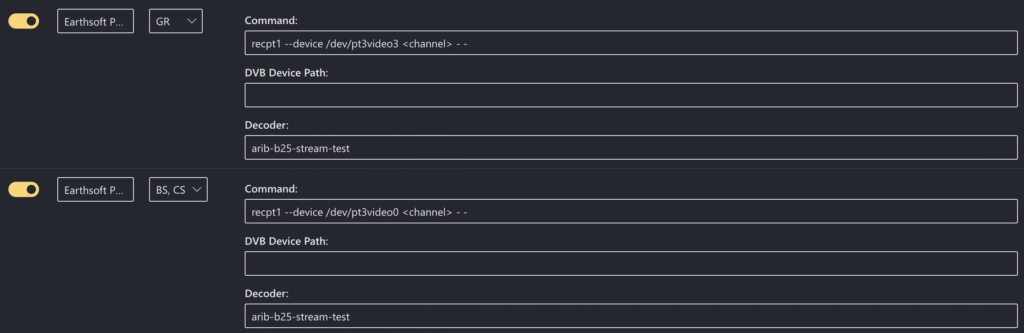
当然ですが、ISDBScannerもrecisdb依存のため、使えません。なので、Mirakurun上で設定します。
MirakurunのConfig内、Tunersの項目で、TunerのCommandを
recpt1 --device /dev/pt3video3 <channel> - -のように設定します。(PT3で地上波の場合の設定)(BSの場合はpt3video0 or pt3video1)
作業は終わりです!

お疲れ様でした!!
コメント